State management with recoil.js
Author: Rafał Kornel
Problem context
State management is a very broad topic, there is a lot of well tested solutions, including patterns, tools embedded into frameworks, or libraries. Recoil.js is yet another tool for managing our state in React projects. This article will cover basics of recoil and showcase interesting use case - improving performance in app where state is distributed and nodes are placed far from each other in DOM tree model.
Recoil.js - introduction
Recoil arose as an internal experiment at Facebook and has become more mature over time. It is currently in version 0.7.6, still in early stage of development, so it might be wise to consider putting it in production environment. However, it's mature enough to provide relevant value to our projects.
Recoil's basic concept is Atom - we can imagine it as separate unit of state. It's similar to regular variables in JS (declared by let). In regular JS/TS we could have:
let value: number = 10;

function incrementValue() {
  value += 1;
}

function printValue() {
  console.log(`Hey, current value is: ${value}`);
}
Here we can see that value variable is atomic unit of state.
When we look on React, we know that we don't have independent state units. Our simple atomic state could look like this:
const Counter = () => {
  const [counter, setCounter] = useState(0);
  const increment = () => setCounter((prev) => prev + 1);
  return (
    <div>
      Current value: {counter}
      <button onClick={increment}>+</button>
    </div>
  );
};
Example above looks familiar and it serves its purpose. But a problem arises. If we want to have two components, that share some state. React-way of solving this problem would be to extract said state to first common parent. But this solutions has one major flaw - every time given value changes, said parent (and whole tree of its children) will re-render.
Recoil's atoms are conceptually similar to common variable from example one.
const KELVIN_OFFSET = 273.15;

const kelvinAtom = atom<number>({ key: "kelvin", default: KELVIN_OFFSET });
First we introduce concept of Atom - it's simple, atomic (duh) unit of state. We can access it from our react components via api very similar to react's useState.
const KelvinTemperature = () => {
  const [kelvin, setKelvin] = useRecoilState(kelvinAtom);
  const increment = () => setKelvin((prev) => prev + 1);

  return (
    <div>
      Temperature in Kelvin: {kelvin.toFixed(2)}
      <button onClick={increment}>+</button>
    </div>
  );
};
Recoil gives us access to state not only by useRecoilState, but also via useRecoilValue and useSetRecoilState.
const KelvinTemperatureIndicator = () => {
  const kelvin = useRecoilValue(kelvinAtom);

  return <div>Temperature in Kelvin: {kelvin.toFixed(2)}</div>;
};

const KelvinTemperatureIncrement = () => {
  const setKelvin = useSetRecoilState(kelvinAtom);

  const increment = () => setKelvin((prev) => prev + 1);

  return <button onClick={increment}>+</button>;
}
As we can see, state is accessed from two separate components. Nice.
Recoil has some other interesting functionality - selectors. We can think of a selector like atom with a layer of abstraction. We can use them, to perform calculations while getting or setting state.
const celsiusSelector = selector<number>({
  key: "celsius",
  get: ({ get }) => kelvinToCelsius(get(kelvinAtom)),
  set: ({ set }, newValue) =>
    set(kelvinAtom, celsiusToKelvin(newValue as number)),
});

const fahrenheitSelector = selector<number>({
  key: "fahrenheit",
  get: ({ get }) => kelvinToFahrenheit(get(kelvinAtom)),
  set: ({ set }, newValue) =>
    set(kelvinAtom, fahrenheitToKelvin(newValue as number)),
});
Selectors are equivalent to atoms, in terms of access - we can use atoms and selectors interchangeably.
const CelsiusTemperature = () => {
  const celsius = useRecoilValue(celsiusSelector);

  return <div>Temperature in Celsius degrees: {celsius.toFixed(2)}</div>;
};
Another interesting feature of recoil are families. Family is a collection of atoms or selectors. We can imagine, that we don't want to have single atom state, but rather a lot of smaller, independent atoms. We can do something like this:
const getAtomById = (id: string) =>
  atom<number>({ key: `atom${id}`, default: getDefault(id) });
Recoil has built in tool for that:
type SomeObject = {
  value: number;
}

// First generic type is type of atom, second is type of parameter
const someAtomFamily = atomFamily<SomeObject, string>({
  key: "SomeObjectState",
  default: (param: string) => getDefault(param)
})

// ... in react component
const [someObject, setSomeObject] = useRecoilState(someAtomFamily('id'));
We can access our specific atom state, by passing id to someAtomFamily, as it's just a function that returns atom.
Our final temperature calculator code would look like this:
import {
  atom,
  RecoilRoot,
  selector,
  useRecoilState,
  useRecoilValue,
} from "recoil";
import { KELVIN_OFFSET } from "../constants";
import {
  celsiusToKelvin,
  fahrenheitToKelvin,
  kelvinToCelsius,
  kelvinToFahrenheit,
} from "../utils";

enum Scale {
  Celsius = "c",
  Fahrenheit = "f",
}

const scaleNames = {
  [Scale.Celsius]: "Celsius",
  [Scale.Fahrenheit]: "Fahrenheit",
};

const kelvinAtom = atom<number>({ key: "kelvin", default: KELVIN_OFFSET });

const celsiusSelector = selector<number>({
  key: "celsius",
  get: ({ get }) => kelvinToCelsius(get(kelvinAtom)),
  set: ({ set }, newValue) =>
    set(kelvinAtom, celsiusToKelvin(newValue as number)),
});

const fahrenheitSelector = selector<number>({
  key: "fahrenheit",
  get: ({ get }) => kelvinToFahrenheit(get(kelvinAtom)),
  set: ({ set }, newValue) =>
    set(kelvinAtom, fahrenheitToKelvin(newValue as number)),
});

type TemperatureInputProps = {
  scale: Scale;
};

const TemperatureInput = ({ scale }: TemperatureInputProps) => {
  const [temperature, setTemperature] = useRecoilState(
    scale === Scale.Celsjus ? celsiusSelector : fahrenheitSelector
  );

  return (
    <fieldset>
      <legend>Input temperature in {scaleNames[scale]} degrees:</legend>
      <input
        value={temperature.toFixed(2)}
        onChange={(e) => setTemperature(Number(e.target.value))}
      />
    </fieldset>
  );
};

const KelvinTemperature = () => {
  const kelvin = useRecoilValue(kelvinAtom);

  return <div>Temperature in Kelvin: {kelvin.toFixed(2)}</div>;
};

export const TemperatureCalculator = () => {
  return (
    <RecoilRoot>
      <div>
        <TemperatureInput scale={Scale.Celsius} />
        <TemperatureInput scale={Scale.Fahrenheit} />
        <KelvinTemperature />
      </div>
    </RecoilRoot>
  );
};
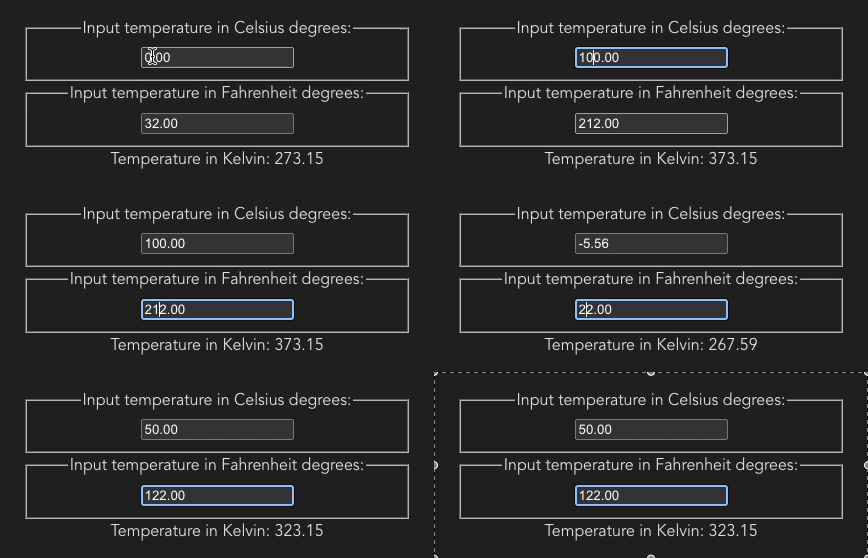
Performance problem
In this article we will aim to provide solution to well defined problem. Let's consider following piece of code
import { useState } from "react";
import {
  generateRandomColor,
  generateRandomX,
  generateRandomY,
} from "../utils";
import { CircleData, circleStyling } from "../constants";
import { useDragging } from "../useDragging";

const Circle = ({ id }: { id: number }) => {
  const [data, setData] = useState<CircleData>({
    id,
    color: generateRandomColor(),
    x: generateRandomX(),
    y: generateRandomY(),
  });

  const [ref, props] = useDragging((newX, newY) =>
    setData((prev) => ({ ...prev, x: newX, y: newY }))
  );

  return (
    <div
      ref={ref}
      {...props}
      style={{
        ...circleStyling,
        left: data.x,
        top: data.y,
        background: `#${data.color}`,
      }}
    />
  );
};

export const Circles = () => {
  const [circleIds, setCircleIds] = useState<number[]>([1, 2]);

  const handleAddCircle = () =>
    setCircleIds((prev) => {
      const newId = prev.length + 1;
      return [...prev, newId];
    });

  return (
    <div>
      <button onClick={handleAddCircle}>+</button>
      {circleIds.map((id) => (
        <Circle key={id} id={id} />
      ))}
    </div>
  );
};
Above example should render some colorfull circles, and give us ability to change their position by dragging.
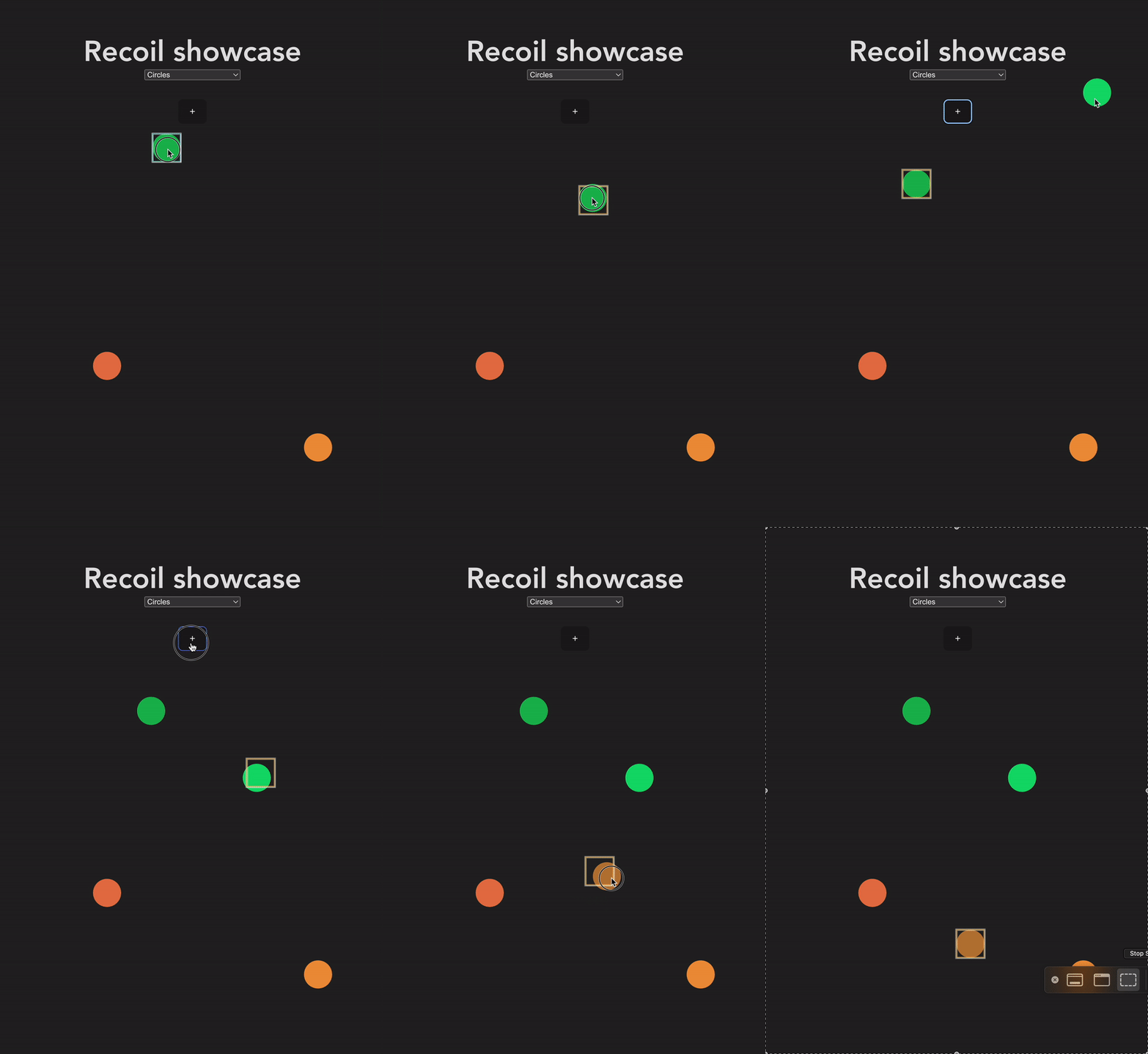
It's worth noting, that in the above animation we can see components re-render, highlighted by square box around component. While we move single circle, we see that only this circle is being re-rendered, and while we add new circle we can notice that all circles are being re-rendered. This is consequence of our state choices - we store positions (x and y values) inside Circle component, but we have to store information about circle ids in main component Circles. When we add new circle (via inserting new id into circleIds array), we have to re-render all of Circles children.
This result is fine, we achieved the goal. But let's consider new requirement: we have to display information about all circles in table. We have to modify our state in order to share it between multiple components:
import { useState } from "react";
import {
  generateRandomColor,
  generateRandomX,
  generateRandomY,
} from "../utils";
import { CircleData, circleStyling } from "../constants";
import { useDragging } from "../useDragging";

type CircleProps = {
  data: CircleData;
  updatePosition: (x: number, y: number) => void;
};

const Circle = ({ data, updatePosition }: CircleProps) => {
  const [ref, props] = useDragging(updatePosition);

  return (
    <div
      ref={ref}
      {...props}
      style={{
        ...circleStyling,
        left: data.x,
        top: data.y,
        background: data.color,
      }}
    />
  );
};

const ListElement = ({ data }: { data: CircleData }) => (
  <li
    style={{
      display: "flex",
      justifyContent: "space-between",
      width: "100%",
    }}
  >
    <div
      style={{ width: "20px", height: "20px", backgroundColor: data.color }}
    />
    <div>id: {data.id}</div>
    <div>x: {data.x.toFixed(0)}</div>
    <div>y: {data.y.toFixed(0)}</div>
  </li>
);

type ListProps = {
  circles: CircleData[];
};

const List = ({ circles }: ListProps) => {
  return (
    <ul>
      {[...circles]
        .sort((a, b) => a.id - b.id)
        .map((data) => (
          <ListElement data={data} key={data.id} />
        ))}
    </ul>
  );
};

export const CirclesWithList = () => {
  const [circles, setCircles] = useState<CircleData[]>([]);

  const handleAddCircle = () =>
    setCircles((prev) => {
      const newId = prev.length + 1;

      const newCircle = {
        color: `#${generateRandomColor()}`,
        x: generateRandomX(),
        y: generateRandomY(),
        id: newId,
      };
      return [...prev, newCircle];
    });

  const handleUpdatePosition = (id: number, x: number, y: number) => {
    setCircles((prev) => {
      const circle = prev.find((c) => c.id === id);

      const filteredPrev = prev.filter((c) => c.id !== id);

      return circle ? [...filteredPrev, { ...circle, x, y }] : prev;
    });
  };

  return (
    <div>
      <button onClick={handleAddCircle}>+</button>
      <List circles={circles} />
      {circles.map((circle) => (
        <Circle
          key={circle.id}
          data={circle}
          updatePosition={(x, y) => handleUpdatePosition(circle.id, x, y)}
        />
      ))}
    </div>
  );
};
From now on, state of individual circles are held in one array, so that List component has access to that data.
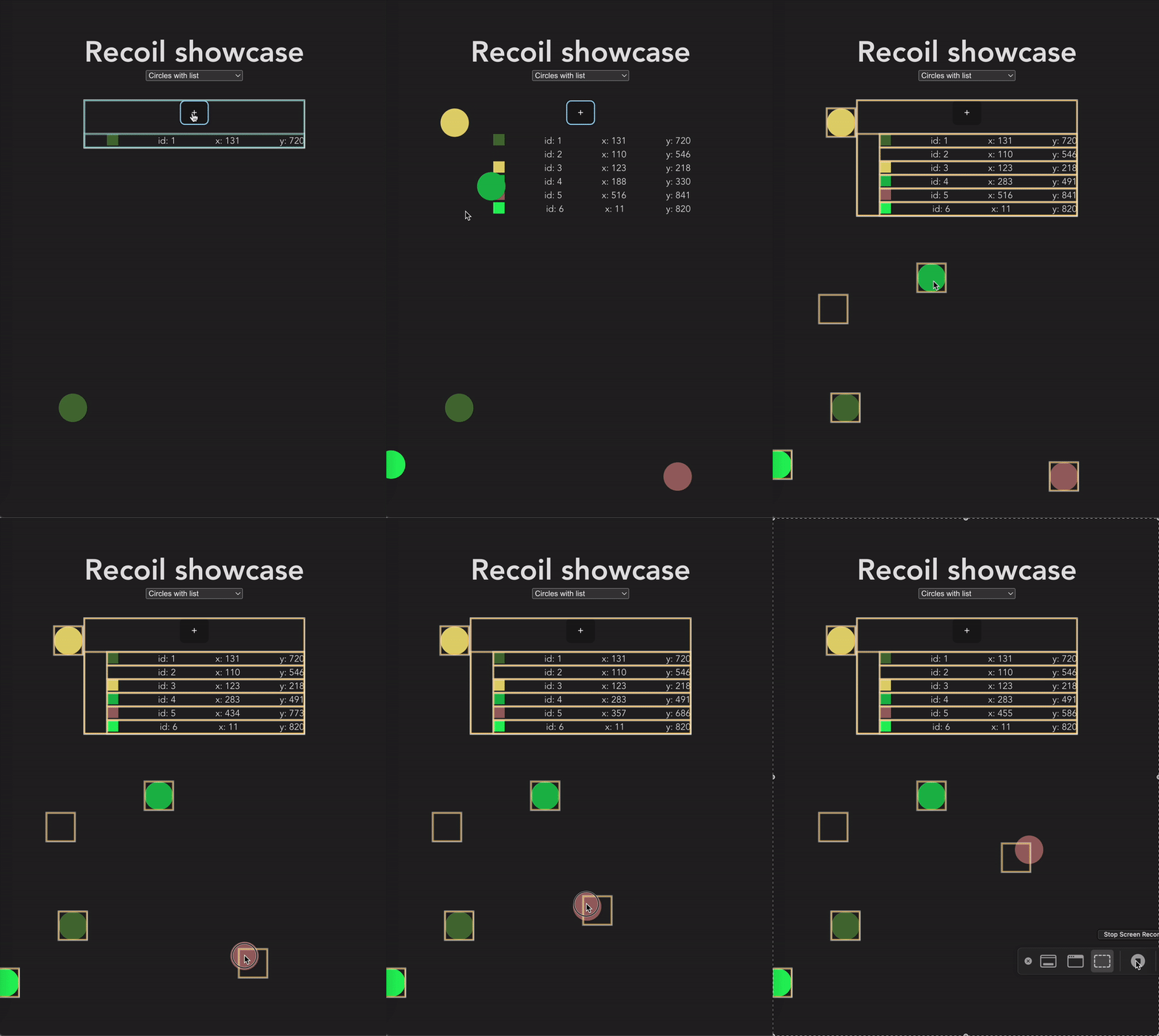
Again, this works fine, but we can notice that each time we move one circle, all of our components re-render. This is caused by fact, that adding new circle means modifying array on top of our components tree.
This is not good, as we may suffer from unnecessary re-renders. Most of our re-rendering are being done to components that don't actually change at all!
So how we can solve this problem? This is the case where recoil comes in handy.
import { useState } from "react";
import {
  generateRandomColor,
  generateRandomX,
  generateRandomY,
} from "../utils";
import { CircleData, circleStyling } from "../constants";
import { useDragging } from "../useDragging";
import { atomFamily, RecoilRoot, useRecoilState } from "recoil";

const circleAtomFamily = atomFamily<CircleData, number>({
  key: "circle",
  default: (id) => ({
    color: `#${generateRandomColor()}`,
    x: generateRandomX(),
    y: generateRandomY(),
    id,
  }),
});

type CircleProps = {
  id: number;
};

const Circle = ({ id }: CircleProps) => {
  const [data, setData] = useRecoilState(circleAtomFamily(id));
  const [ref, props] = useDragging((x, y) =>
    setData((prev) => ({ ...prev, x, y }))
  );

  return (
    <div
      ref={ref}
      {...props}
      style={{
        ...circleStyling,
        left: data.x,
        top: data.y,
        background: data.color,
      }}
    />
  );
};

const ListElement = ({ id }: { id: number }) => {
  const [data] = useRecoilState(circleAtomFamily(id));

  return (
    <li
      style={{
        display: "flex",
        justifyContent: "space-between",
        width: "100%",
      }}
    >
      <div
        style={{ width: "20px", height: "20px", backgroundColor: data.color }}
      />
      <div>id: {data.id}</div>
      <div>x: {data.x.toFixed(0)}</div>
      <div>y: {data.y.toFixed(0)}</div>
    </li>
  );
};

const List = ({ circleIds }: { circleIds: number[] }) => {
  return (
    <ul>
      {[...circleIds]
        .sort((a, b) => a - b)
        .map((id) => (
          <ListElement key={id} id={id} />
        ))}
    </ul>
  );
};

export const CirclesWithListOptimized = () => {
  const [circleIds, setCircleIds] = useState<number[]>([]);

  const handleAddCircle = () =>
    setCircleIds((prev) => {
      const newId = prev.length + 1;

      return [...prev, newId];
    });

  return (
    <RecoilRoot>
      <div>
        <button onClick={handleAddCircle}>+</button>
        <List circleIds={circleIds} />
        {circleIds.map((id) => (
          <Circle key={id} id={id} />
        ))}
      </div>
    </RecoilRoot>
  );
};
We have extracted each circle state to atomFamily, and we can access that data from ListElement and Circle components by providing id. In circleAtomFamily we have provided function for generating default values for each atom.
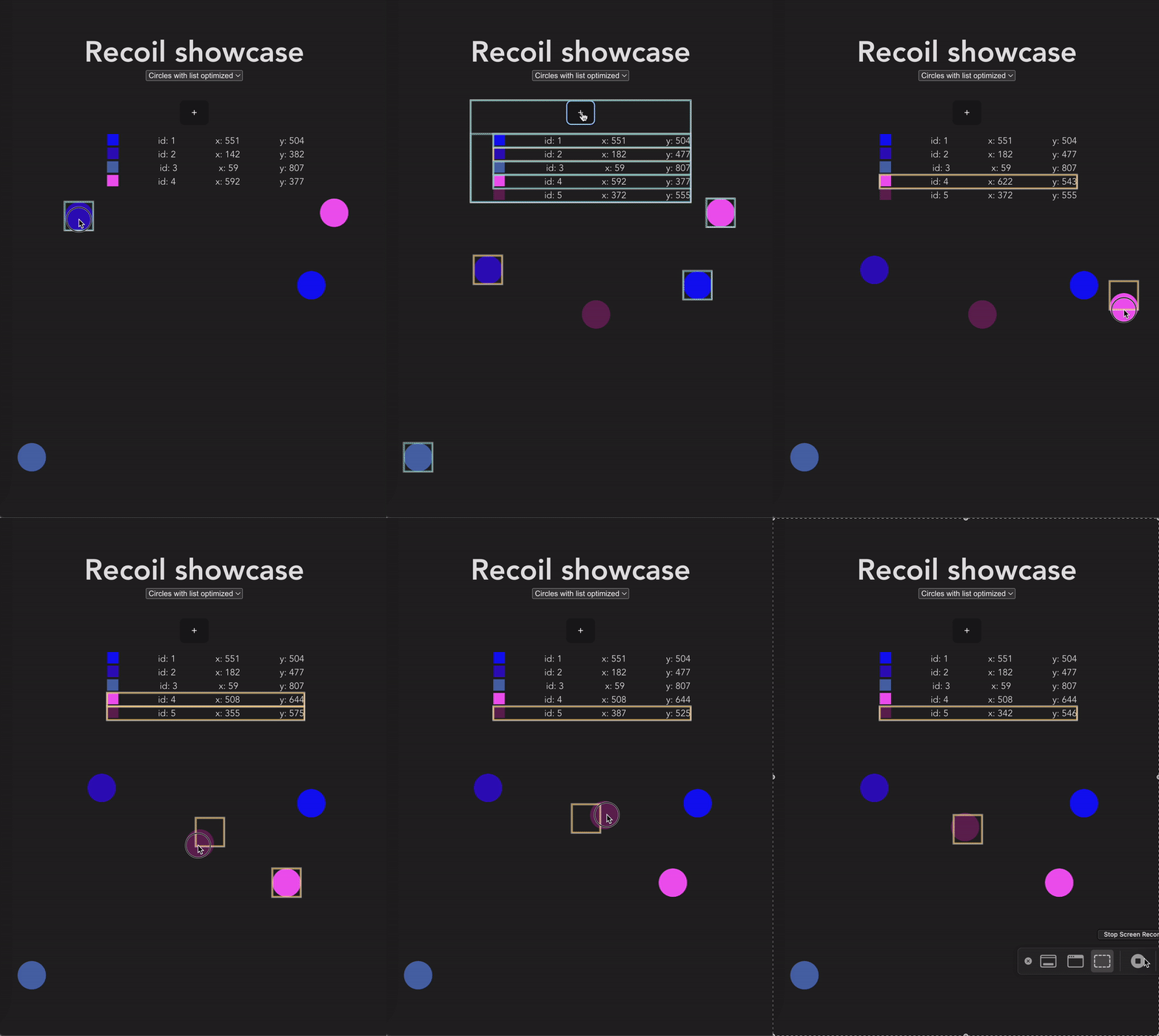
We can notice that when we move individual circle, only two components are being re-rendered: Circle that we are moving, and ListElement (which is basically li). So we've achieved our goal! Now we don't suffer from unnecessary re-renders. We are only performing calculations for components, that actually should be re-rendered.
Now, this example is a little bit abstract, and also it doesn't really need any optimizations. But you can probably imagine very complex applications, with hundreds or even thousands of components in react tree, and case where we have to connect two very distant components by common state. Extracting this state to context or useState higher in tree might not be ideal, because it might trigger a lot of unnecessary re-renders, for components that are not even involved in this state!
Conclusion
Recoil is new promising state management tool. It has been tested by developers around the world, and it proved it's value. It might not be perfect solution for everyone, but it's small (23 kB minified + gzipped) and powerfull.
Pros and cons of solution
Pros:
- solves specific optimization problem (connecting distant components)
- is being developed by facebook - company responsible for react
- is easy to learn - has API very similar to react's native
useState - easy to integrate with
GraphQL - out of box support for time traveling
Cons:
- still in early phase
- tied to react
- might not be the best use case for large projects
Additional resources
- Full code from examples above
- Live demo
- Recoil website
- Interesting introductory showcase of recoil
- Recoil in bundlephobia
- Recoil's npm